
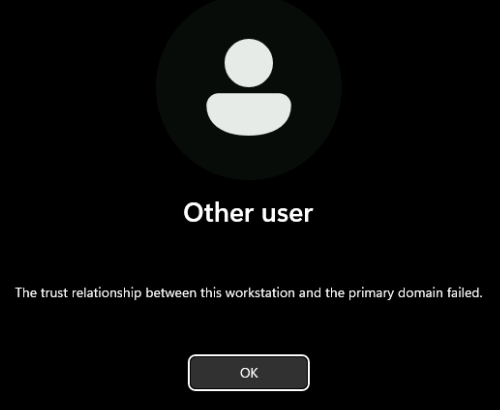
如何解決Windows登入時‧出現『The trust relationship between this workstation and the primary domain failed』錯誤
01. 在公司中,用戶電腦久不久就會有一兩個,在登入Windows時出現『The trust relationship between this workstation and the primary domain failed』錯誤。
02. 以前做法,是重新退出/加入網域(domain),就可以解決問題。但從來沒有研究是甚麼問題。多得早幾日轉domain時問題,又找到一堆PowerShell指令,用來應付/解決以上錯誤,所以順便記錄一下。
03. 以網域管理員(domain administrator)身份,在用戶電腦執行『PowerShell』指令。
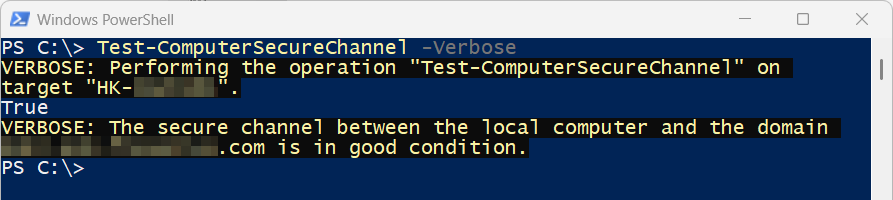
04. 執行以下指令,會看到目前網域(domain)同用戶電腦之間安全通道(secure channel)狀態。如出現錯誤,就要找出問題所在及原因。
Test-ComputerSecureChannel -Verbose
05. 執行以下指令,重設網域(domain)同用戶電腦之間安全通道(secure channel)。
Test-ComputerSecureChannel -Repair -Credential (Get-Credential) -Verbose
06. 假若執行以下指令,重設網域(domain)同用戶電腦之間安全通道(secure channel)不成功,就需要退出/加入網域(domain)。
07. 為避免用戶電腦在退出網域(domain)後,鎖死在登入畫面(原以為是傳說,想不到早2天真的發生了,退出網域(domain)後,登入居然仍然顯示網域用戶登入畫面,完全不能更改登入方式)。退出網域(domain)前,記得一定要登入本機地管理員(local administrator)帳戶。
Remove-Computer -UnjoinDomainCredential (Get-Credential) -Force -Restart
08. 退出網域(domain)及重新啟動電腦後,登入本機地管理員(local administrator)帳戶。再以本機地管理員身份,執行『PowerShell』指令。
09. 刪除『Windows Registry』中,網域(domain)殘留下來資料。
Remove-ItemProperty "HKLM:\SYSTEM\CurrentControlSet\Services\Tcpip\Parameters" -Name Domain, "NV Domain", DhcpDomain -ErrorAction SilentlyContinue
Remove-ItemProperty "HKLM:\SOFTWARE\Microsoft\Windows NT\CurrentVersion\Winlogon" -Name DefaultDomainName, AltDefaultDomainName -ErrorAction SilentlyContinue
10. 重啟『netlogon』服務。
net stop netlogon
net start netlogon
11. 重新加入網域(domain)。
Add-Computer -DomainName "newdomain.com" -Credential (Get-Credential) -Restart -Force
12. 重新啟動電腦後,再次檢查網域(domain)同用戶電腦之間安全通道(secure channel)狀態。
Test-ComputerSecureChannel -Verbose
發佈留言