
如何解決在Windows 11中轉新網域(new domain)後‧登入至(Sign in to)欄位仍然指向舊網域(old domain)
01. 公司要轉domain,所以同事們的電腦全部都要轉到新domain上。
02. 在電腦上退出domain,重新加入新domain,問題就出現了。
03. 在『System Properties』中,domain已顯示為新domain名稱,但『Full computer name』,卻仍然顯示為『hostname』加『舊domain』。
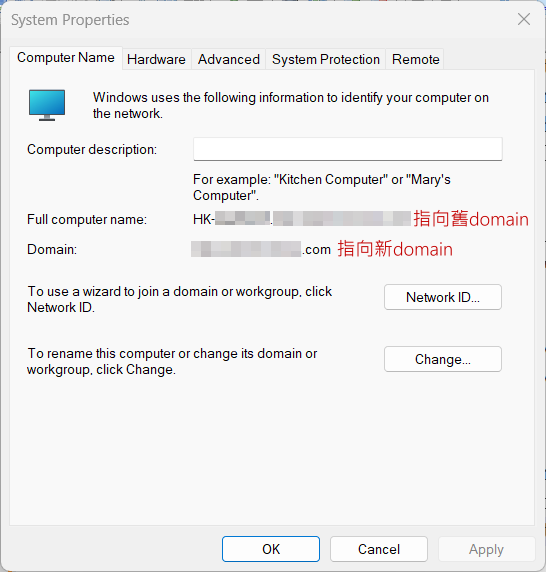
04. 起初以為是Primary DNS Suffix問題,不斷針對『Windows Registry』更改『HKEY_LOCAL_MACHINE\SYSTEM\CurrentControlSet\Services\Tcpip\Parameters』內『Domain』、『NNVDomain』、『SyncDomainWithMembership』,及『HKEY_LOCAL_MACHINE\Software\Policies\Microsoft\System\DNSclient』內『NV PrimaryDnsSuffix』、『PrimaryDnsSuffix』、『DhcpDomain』,不斷的退出/加入domain,結果仍然更加不了『Full computer name』,更發現『Full computer name』,是會直接影響Windows登入時『Sign in to』欄位,仍然顯示舊domain名稱。
05. 玩了半天後,在Grok AI幫助下,又有新的發現。
06. 在問題電腦上,以系統管理員身份,執行『Powershell』命令。
(Get-CimInstance Win32_ComputerSystem).Domain
(Get-ItemProperty "HKLM:\SYSTEM\CurrentControlSet\Services\Tcpip\Parameters")."NV Domain"
(Get-ItemProperty "HKLM:\SOFTWARE\Microsoft\Windows NT\CurrentVersion\Winlogon").DefaultDomainName
07. 我的結果是:
(Get-CimInstance Win32_ComputerSystem).Domain => 新domain
(Get-ItemProperty "HKLM:\SYSTEM\CurrentControlSet\Services\Tcpip\Parameters")."NV Domain" => 新domain
(Get-ItemProperty "HKLM:\SOFTWARE\Microsoft\Windows NT\CurrentVersion\Winlogon").DefaultDomainName => 舊domain
08. 所以我的問題,就是出在『HKLM:\SOFTWARE\Microsoft\Windows NT\CurrentVersion\Winlogon』位置。
09. 繼續在『Powershell』中,執行以下命令。
# use the short NetBIOS name
$newDomain = "newdomain.com"

# Force correct values again
Set-ItemProperty "HKLM:\SOFTWARE\Microsoft\Windows NT\CurrentVersion\Winlogon" -Name DefaultDomainName -Value $newDomain -Force
Set-ItemProperty "HKLM:\SOFTWARE\Microsoft\Windows NT\CurrentVersion\Winlogon" -Name AltDefaultDomainName -Value $newDomain -Force
Set-ItemProperty "HKLM:\SOFTWARE\Microsoft\Windows NT\CurrentVersion\Winlogon" -Name DefaultUserName -Value "" -Force

# Completely wipe LogonUI state
$logonUI = "HKLM:\SOFTWARE\Microsoft\Windows\CurrentVersion\Authentication\LogonUI"
Get-Item $logonUI -ErrorAction SilentlyContinue | Get-ItemProperty | ForEach-Object {
$_.PSObject.Properties.Name | Where-Object { $_ -notmatch "PS" } | ForEach-Object {
Remove-ItemProperty -Path $logonUI -Name $_ -ErrorAction SilentlyContinue
}
}
Remove-Item "$logonUI\SessionData" -Recurse -Force -ErrorAction SilentlyContinue
Remove-Item "$logonUI\SessionData\*" -Recurse -Force -ErrorAction SilentlyContinue

# Clear any policy override
Remove-ItemProperty "HKLM:\SOFTWARE\Policies\Microsoft\Windows\System" -Name DefaultLogonDomain -ErrorAction SilentlyContinue
Remove-ItemProperty "HKLM:\SOFTWARE\Microsoft\Windows\CurrentVersion\Policies\System" -Name DefaultLogonDomain -ErrorAction SilentlyContinue

# Clear credential targets that may still reference the old domain
cmdkey /list | Select-String "Domain:target=" | ForEach-Object {
    $target = ($_ -split "Domain:target=")[1].Trim()
    if ($target) { cmdkey /delete:$target 2>$null }
}

Restart-Computer
10. 重新啟動電腦後,檢查Windows登入時『Sign in to』欄位,是否已顯示新domain名稱。如正確,以新domain用戶登入一次,所有問題就解決了。
11. 如『Sign in to』欄位仍然顯示舊domain名稱,AI建議檢查『Windows Registry』所有在『HKEY_LOCAL_MACHINE』中,仍出現舊domain再作分析。
$oldDomain = "olddomain.com"
Get-ChildItem -Path HKLM:\SOFTWARE\Microsoft\Windows, HKLM:\SOFTWARE\Policies -Recurse -ErrorAction SilentlyContinue | Get-ItemProperty -ErrorAction SilentlyContinue | Where-Object { $_.PSObject.Properties.Value -match $oldDomain } | Select-Object PSPath
發佈留言